JavaScript Syllabus
Introduction
The W3Schools JavaScript Tutorial is comprehensive and beginner-friendly.
It will give you a fundamental knowledge of JavaScript.
It is designed for beginners and requires no prior experience with programming.
The content has been carefully made to be bite-sized, simple, and easy to understand.
The content has been proven by millions of users over the years. It is updated and improved frequently.
The syllabus outline and its sequence are structured so you can learn JavaScript step by step, from the introduction to creating your first application with JavaScript.
Learning Outcomes
- Learn how JavaScript works and how it is used in web development.
- Make web pages interactive by typing and running JavaScript code.
- Use variables to store and change data.
- Use data types and operators to do logic and calculations.
- Organize and reuse code by functions.
- Conditions, like "if" and "else," let you control how a program runs. Learn how to use them.
- Use loops (like for and while) to do things over and over again.
- Learn how to use Document Object Model (DOM) to change HTML elements.
- Make interactive user experiences by handling events like button clicks and form submissions.
- Debugging JavaScript code.
Note: Are you a teacher teaching JavaScript? W3Schools Academy is a toolbox of features that can help you teach. It offers classroom features such as pre-built study plans, classroom administration and much more. Read more about Academy here.
Which Subjects Are JavaScript Relevant For?
-
Computer Science (CS) / Information Technology (IT):
JavaScript is a fundamental programming language used to teach coding, algorithms, and how to make websites that people can interact with. -
Math:
JavaScript can be used for mathematical operations and algorithms. It can help you develop logical thinking and problem-solving skills. -
Physics and Engineering:
JavaScript can be used for simulations and modeling to help you understand advanced concepts and engineering problems better. -
Digital Media:
JavaScript is used to make websites interactive, making your digital projects more relevant and interesting. -
Business and Entrepreneurship:
JavaScript makes your web applications, prototypes, and digital presentations interactive. -
Art and Design:
JavaScript lets you make animations, interactive graphs, and can be used for generative art. -
STEM (Science, Technology, Engineering, Mathematics):
JavaScript as a programming language can be an important part of technology-based projects because it teaches students about logic, automation, and how to use code in the real world. -
Robotics and the Internet of Things (IoT):
JavaScript is used by some platforms to program robots and IoT devices.
Activities
In this tutorial we offer different activities for you to learn JavaScript for free:
Sign in to Track Progress
You can also create an account to track your progress.
As a signed-in user, you get access to features such as:
- Learning paths
- Sandbox and lab environments
- Achievements
- And much more!
Overview of the Modules
- JavaScript HOME
- JavaScript Introduction
- JavaScript Where To
- JavaScript Output
- JavaScript Statements
- JavaScript Syntax
- JavaScript Comments
- JavaScript Variables
- JavaScript Let
- JavaScript Const
- JavaScript Operators
- JavaScript Arithmetic
- JavaScript Assignment
- JavaScript Data Types
- JavaScript Functions
- JavaScript Objects
- JavaScript Events
- JavaScript Strings
- JavaScript String Methods
- JavaScript String Search
- JavaScript String Templates
- JavaScript Numbers
- JavaScript BigInt
- JavaScript Number Methods
- JavaScript Number Properties
- JavaScript Arrays
- JavaScript Array Methods
- JavaScript Array Search
- JavaScript Array Sort
- JavaScript Array Iteration
- JavaScript Array Const
- JavaScript Dates
- JavaScript Date Formats
- JavaScript Date Methods
- JavaScript Set Methods
- JavaScript Math
- JavaScript Random
- JavaScript Booleans
- JavaScript Comparisons
- JavaScript If Else
- JavaScript Switch
- JavaScript For Loop
- JavaScript For In
- JavaScript For Of
- JavaScript While Loop
- JavaScript Break and Continue
- JavaScript Iterables
- JavaScript Sets
- JavaScript Set Methods
- JavaScript Maps
- JavaScript Map Methods
- JavaScript typeof
- JavaScript Type Conversion
- JavaScript Destructing
- JavaScript Bitwise
- JavaScript RegExp
- JavaScript Precedence
- JavaScript Errors
- JavaScript Scope
- JavaScript Hoisting
- JavaScript Strict Mode
- JavaScript this Keyword
- JavaScript Arrow Function
- JavaScript Classes
- JavaScript Modules
- JavaScript JSON
- JavaScript Debugging
- JavaScript Style Guide
- JavaScript Best Practices
- JavaScript Mistakes
- JavaScript Performance
- JavaScript Reserved Words
- JavaScript Versions
- JavaScript Objects
- JavaScript Functions
- JavaScript Classes
- JavaScript Async
- JavaScript HTML DOM
- JavaScript Browser DOM
- JavaScript Web APIs
- JavaScript AJAX
- JavaScript JSON
- JavaScript vs. jQuery
- JavaScript Graphics
Sandbox and Lab Environment
JavaScript, like any other programming language, is best learned by working hands-on with code.
Easily try code with our "Try it Yourself" editor.
Here, you can edit JavaScript code and view the result:
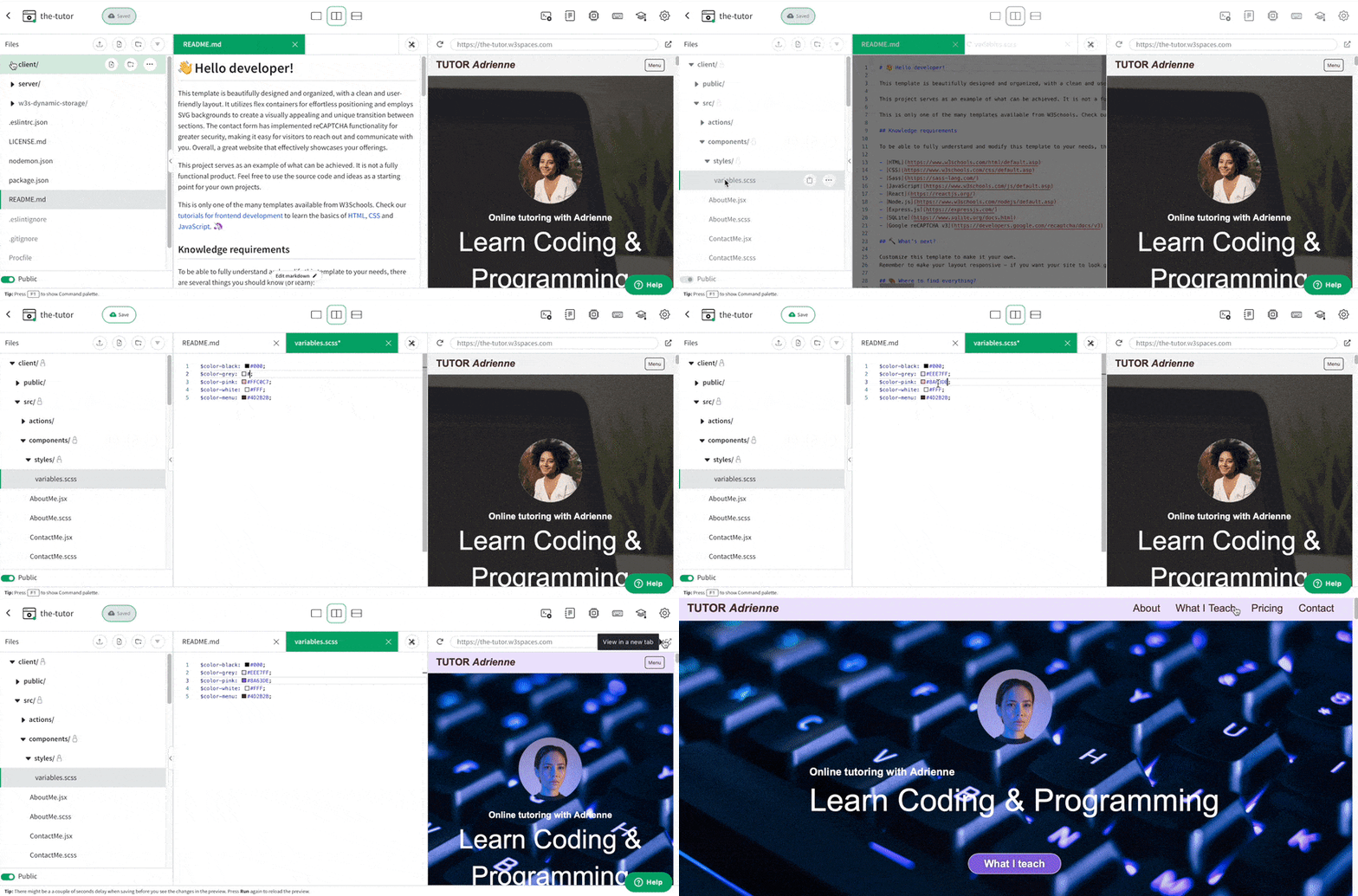
If you want to explore more and host your JavaScript project, we have a feature called Spaces that allows you to build, test and deploy static websites.
Here you get a secure sandbox environment called Spaces, where you can practice coding and test projects in real-time.
Spaces allow you to test, build, and deploy code. This includes a W3Schools subdomain, hosting, and secure SSL certificates.
Spaces require no installation and run directly in the browser.
Features include:
- Collaboration
- File navigator
- Terminal & log
- Package manager
- Database
- Environment manager
- Analytics
JavaScript Certification
W3Schools offers an end-of-pathway certification program.
Here you can take exams to get certified.
The JavaScript exam is a test that summarizes the W3Schools JavaScript syllabus.
After passing the exam you get the "Certified JavaScript Developer" Certification.
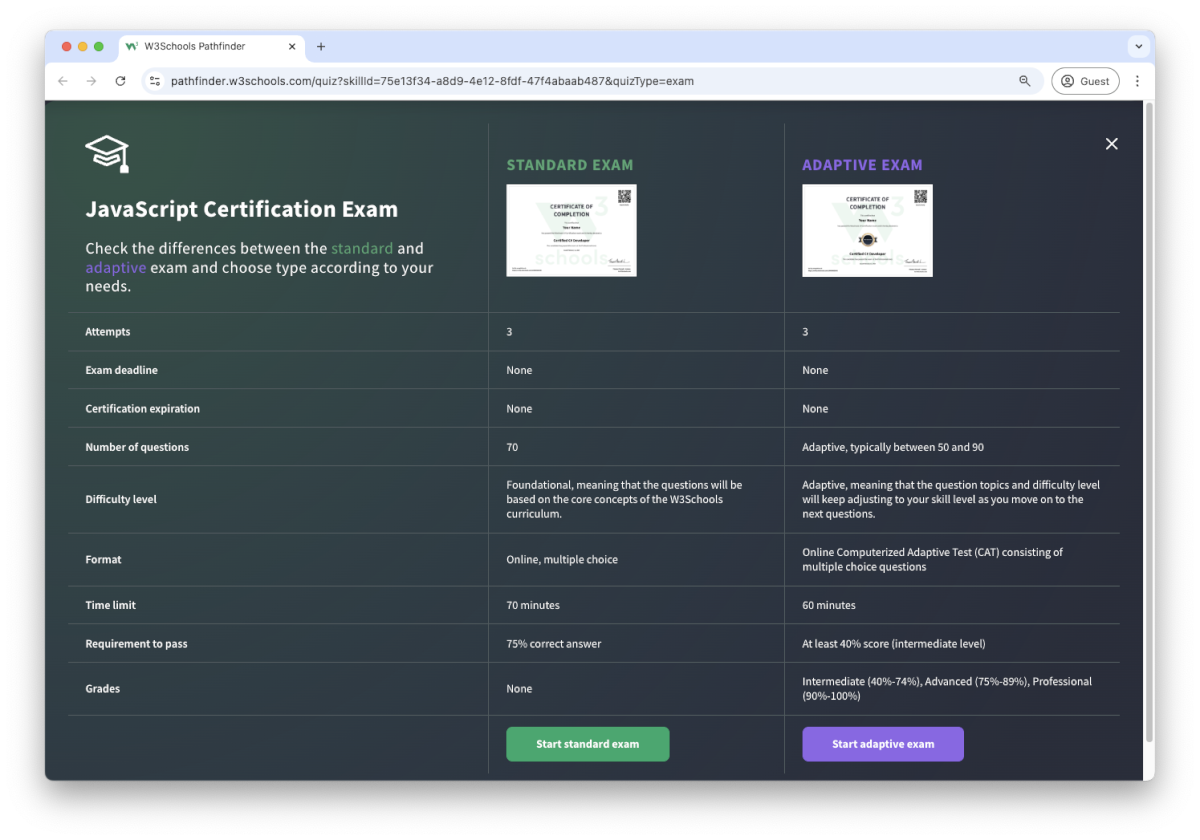
There are two different types of certifications:
- Non-adaptive
- Adaptive
The non-adaptive is pass or no pass.
The adaptive certification is adaptive and graded; students will get a grade from intermediate, advanced to professional.
Are You a Teacher?
Are you interested in learning how you can use W3Schools Academy to Teach JavaScript?
Watch a demo of W3Schools Academy. You'll see how it works, and discover how it can make teaching programming easier and more engaging.